How to write a LinkedIn post, step by step
Seven steps, each with a number behind it: 140 characters before the cut, 150 to 250 words for reach, and what your first post should be. In plain English.
- writing
- how to
- personal branding
How do you write a LinkedIn post?
Start from one thing that happened to you. Open with two lines that make a reader tap see more, say one idea in short paragraphs, and end with what you think. Keep it to about 150 to 250 words. That shape matches how LinkedIn shows a post and how people read one.
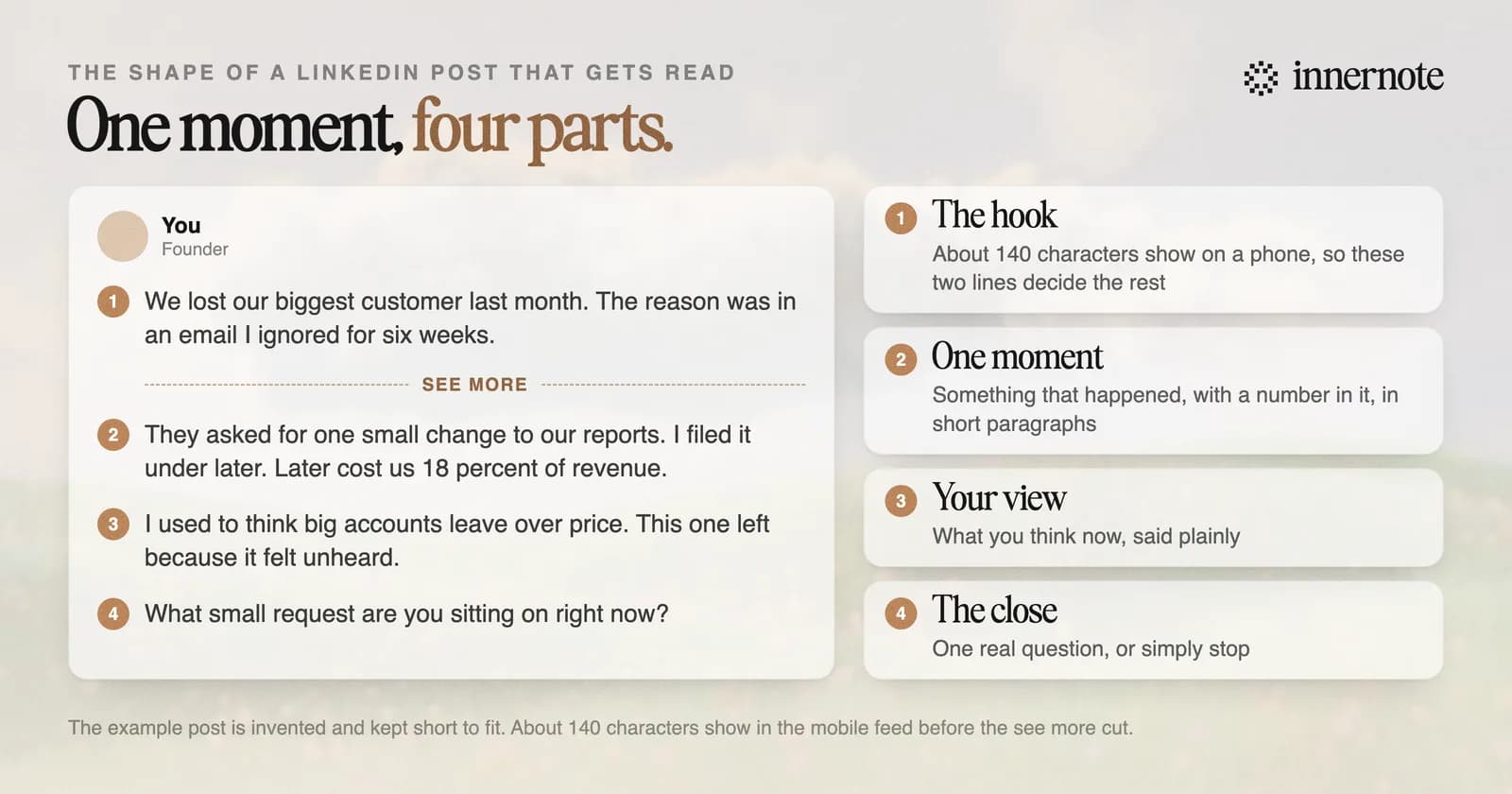
- 1.Pick one moment. A call that went badly, a number that surprised you, a decision you reversed. One post carries one idea.
- 2.Write the opening for the cut. A phone shows about 140 characters before see more, so the first two lines decide whether anyone reads the rest. The full method is in LinkedIn hooks.
- 3.Tell it in short paragraphs of one or two sentences. Readers scan before they commit, and white space gives them places to rest.
- 4.Say what you think. Add the one opinion a reasonable person could disagree with. A post with no view gives nobody a reason to reply.
- 5.Stop at about 150 to 250 words. In a count of 167,940 posts, reach peaked between 150 and 175 words.
- 6.End on your point or one real question. Do not ask for likes: LinkedIn said in 2022 that it would not promote posts that ask for reactions only to boost reach.
- 7.Check it before you publish. See where the cut falls in the post preview, and read it aloud once.
That is the whole method. The rest of this page answers the three questions people ask next: how long a post should be, what to post first, and how to do it quickly. If you have never posted, or stopped for a while, begin with how to start posting on LinkedIn.
Two things trip up people who know their subject well. Why they lose readers is in the curse of knowledge, and a test for every sentence is in LinkedIn copywriting: three rules for every line.
How long should a LinkedIn post be?
About 150 to 250 words, which is roughly 900 to 1,500 characters. LinkedIn allows 3,000 characters, but when The Shield Index counted 167,940 posts, reach peaked at 150 to 175 words and fell after about 250. Longer posts did earn more comments, so the right length depends on what you want.
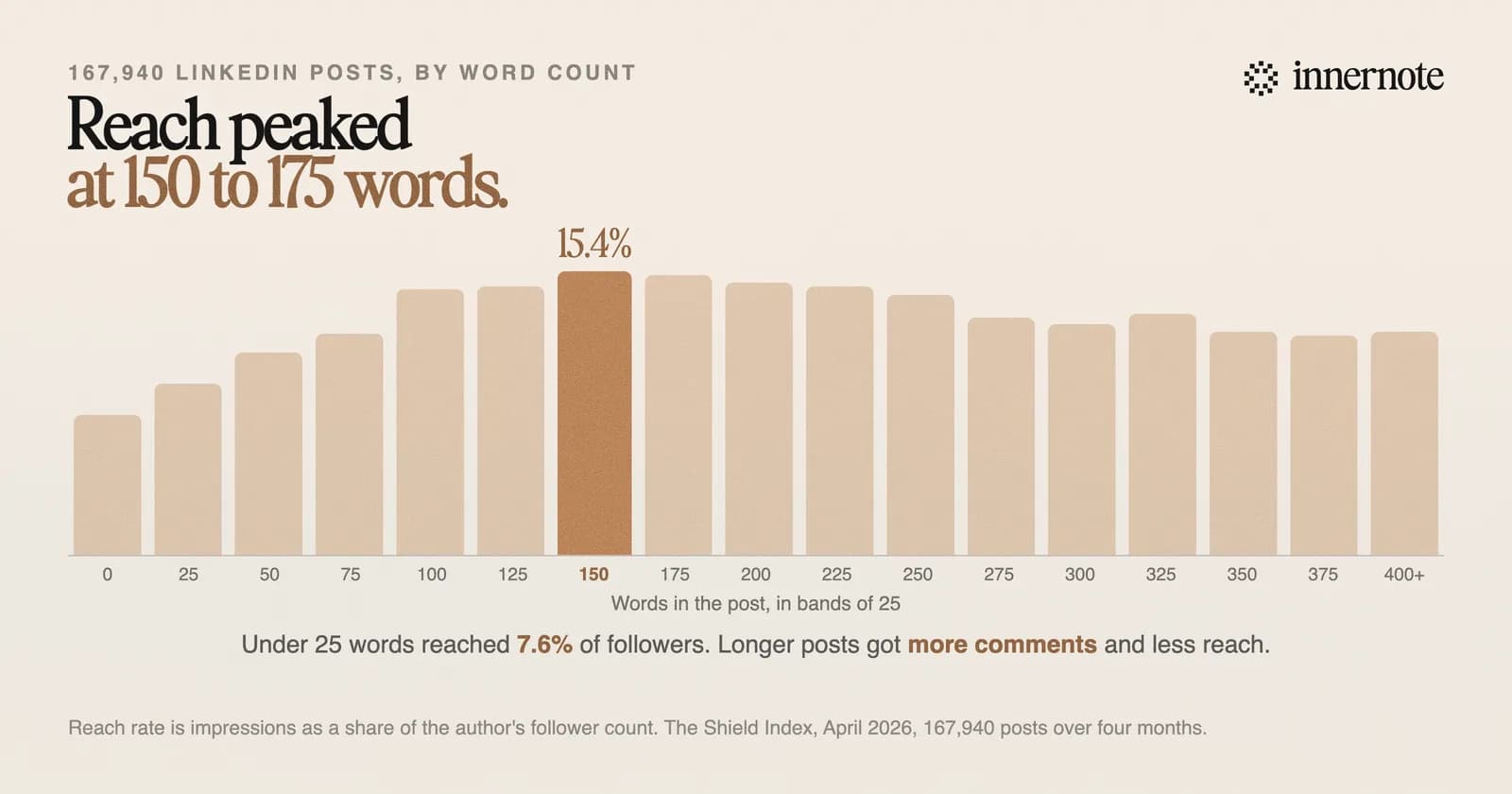
The details are worth a look. Posts under 25 words reached about half as far as posts of 150 to 175 words. Going from 75 words to 150 was worth roughly 30 percent more reach. Past 250 words reach slipped, but the engagement rate rose from 2.23 percent on short posts to 2.71 percent on very long ones, and comments per view tripled.
Whatever the length, the first 140 characters do the heavy work, because that is all a phone shows before the cut. Every limit, and where each one bites, is in every LinkedIn character limit. You can count as you type in the character counter.
Write about 150 to 250 words, and spend half your effort on the first two lines.
What should your first LinkedIn post be?
Something specific you learned at work recently, written the way you would say it to a colleague. It does not need to introduce you or announce anything. A first post that teaches one small thing shows people what to expect from you, and that is what makes them follow.
Keep the format plain. In The Shield Index's sample of 50,000 posts from March 2026, a typical image post reached 14 percent of the author's follower count and a text post 12 percent. Video reached 7 percent and a repost 6. So write your own words, add a real photo if you have one, and do not start with a repost. What the two repost buttons do is in repost vs repost with your thoughts.
It is normal to feel exposed. LinkedIn's own editor in chief has said it is a hard place to post because it is your real identity, and your boss or a future boss may be reading. The numbers help here: a typical post from an account under 1,000 followers is shown about 165 times. The first one is practice, and what counts as a good result is lower than most people think. So is the normal number of likes.
If you do not know what to write about, keep a list of things you saw, decided or changed your mind about this month. That habit is covered in where LinkedIn content ideas come from. Ten ideas to start from are in what to post on LinkedIn, and five finished shapes are in LinkedIn post examples.
How do you write a LinkedIn post fast without sounding like AI?
Start from your own material, not from an empty prompt. An AI tool asked for a LinkedIn post about leadership returns the average of every such post, and readers notice. Give it your notes, your numbers and the way you talk, and the draft comes back sounding like you.
This matters more in 2026 than it did before. LinkedIn added a way to report posts that seem like AI slop in July, and a month later said such posts were getting 40 percent fewer views. Its editor in chief, talking about newsletters, put it simply: voice matters over everything else in a ChatGPT world. The problem is the generic draft, not the help. More in is ChatGPT good enough for LinkedIn posts.
Two quick checks before you post. Paste the draft into the AI text cleaner to see what still reads as machine-written, and read it aloud. If you would not say a sentence to a colleague, cut it.
This is the job innernote was built for. It learns how you write from your own posts and a short conversation. Then you give it a voice note or a rough thought, and it writes the post in your voice, formatted for the feed. You go from idea to finished post in minutes, and it still sounds like you. Free trial, no card needed.
Quick answers
Keep going