LinkedIn's 'seems like AI slop' button, and what it costs you
LinkedIn shipped a report button for AI-sounding posts in July 2026. A million clicks later, here is what it flags, what it does to reach, and what the data really says.
- ai content
- reach
- 2026
What is LinkedIn's AI slop button?
On 30 July 2026 LinkedIn added an option reading seems like AI slop to the three-dot menu on posts and comments, next to not interested and report post. Any member can use it. The reports feed the models LinkedIn uses to identify low-effort AI content and to decide how far it travels.
LinkedIn's chief product officer Hari Srinivasan announced it, and was direct about why. AI slop is a top priority for all of us, he said. We really care about this. People come to LinkedIn to connect with real people and share their real perspectives, ideas, and expertise.
He was equally direct about the difficulty, which is the more interesting half. Slop is hard to define and the definition changes, he said, and described the button as a way to tune the models and make better feeds. This is a platform admitting that it cannot write down the rule, so it is asking a billion people to point at examples instead.
There is no published list of what counts as slop. The definition is whatever a large number of readers keep pointing at, and it moves.
Is the button actually doing anything?
By LinkedIn's own account, yes, and fast. The button was used more than a million times in its first two weeks. Srinivasan said in August that members are now experiencing 40 percent less views on what we classify as AI slop from just a few weeks ago.
Note the wording, because it matters. The 40 percent figure is about what LinkedIn classifies as slop, not about posts that were reported. Reports are training data for a classifier; the classifier is what suppresses reach. Being reported is not the penalty. Being learned from is.
Three things follow from that, and none of them are obvious.
- The effect is not limited to reported posts. A classifier trained on a million examples generalises to posts nobody reported, including yours.
- The suppression is mostly outside your network. Reports reduce how far a post travels beyond the people who already follow you, which is precisely where new readers come from.
- You may find out privately. LinkedIn added a notice in post analytics telling authors when their content has drawn these reports, which is a warning rather than a punishment, and worth reading as one.
This comes on top of an already narrower feed. If your numbers fell earlier in the year and you assumed this was the cause, the timing does not fit and the reason was probably structural, which we covered in why LinkedIn reach dropped in 2026. Where the button sits among the year's other changes is in LinkedIn algorithm changes in 2026.
How much of LinkedIn is actually written by AI?
Nobody knows, and the two best public attempts disagree by roughly a factor of two. Originality.ai analysed 5,000 public LinkedIn posts of at least 100 words in July 2026 and classified 81.2 percent as likely AI. Pangram looked at public long-form posts from April to June 2026 and put the figure at 41 percent, with 30 percent of comments.
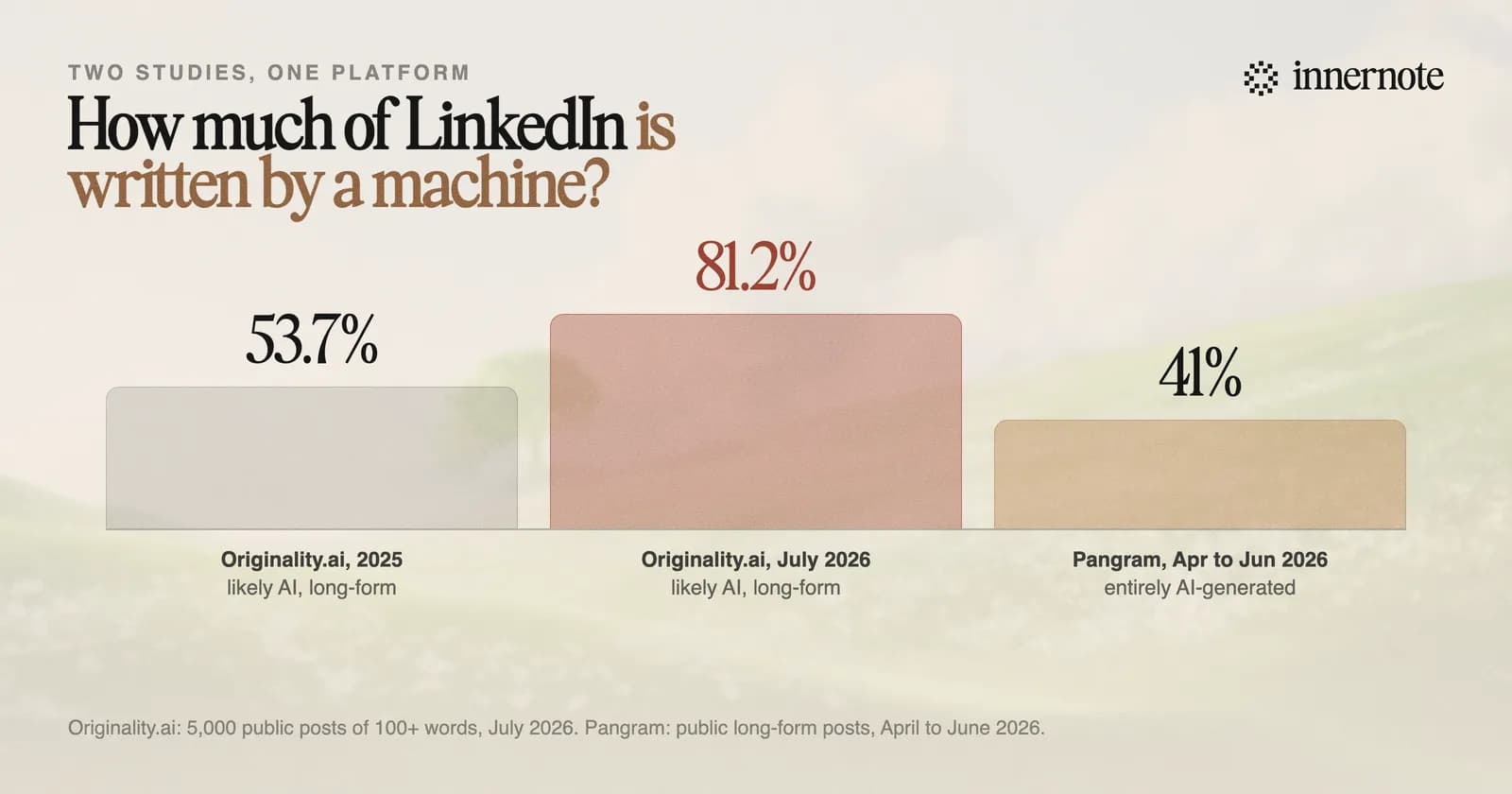
Both are real studies with published methods, and the gap is mostly definitional. Likely AI on a confidence threshold is a different question from entirely AI-generated. The samples differ too: Originality.ai is explicit that it drew from search results rather than anyone's feed, which is not the same population as the posts you actually see.
What the two agree on is the direction and the order of magnitude. Somewhere between four in ten and eight in ten long-form posts now read as machine-written, up sharply from about half in 2025 on the measure that has been run twice. That is the number that matters, and it is the one people quote least, because it is less dramatic than either headline. We made the same argument about the wider benchmark problem in most LinkedIn engagement benchmarks fail their own arithmetic.
The useful takeaway is not the percentage. It is that sounding like a person is now a scarce quality on a professional network, which is a strange sentence to have to write.
Does LinkedIn penalise AI writing, or something else?
Something else, and the distinction is the whole point. LinkedIn has not said that using AI to write is against anything. What it has repeatedly acted against is content with no perspective in it, the sort that could have been produced by anyone about anything. The tool used to make it is not the target. The absence of a person in it is.
The clearest evidence for that reading is what LinkedIn did to its own product in the same period. It removed the enhance your post feature, which rewrote what you had written, and replaced it with a proofreading tool that corrects errors without changing your voice. A platform that objected to AI in the drafting process would not have shipped the replacement. A platform that objects to homogenised output would ship exactly that.
People come to LinkedIn to connect with real people and share their real perspectives, ideas, and expertise.
Hari Srinivasan, chief product officer, LinkedIn
This is also why the common defensive move fails. People respond to all of this by trying to avoid whatever they have heard is a tell, swapping a punctuation mark or a phrase and posting the same hollow paragraph. Readers are not pattern-matching on punctuation. They are noticing that nothing in the post could only have been written by the person whose name is on it. A million people did not click that button because of a dash.
We went through the underlying reason generic drafts read the way they do in why AI LinkedIn posts sound cringe, and what a penalty does and does not look like in does LinkedIn penalise AI-generated posts. LinkedIn's editor in chief made a similar point on camera that July, in an interview we transcribed for why your LinkedIn impressions are low. What LinkedIn can label, and what it can only limit, is in can LinkedIn detect AI.
What do you do about it?
Put something in each post that only you could have put there. That is the entire defence, it is not a trick, and it is the one thing no amount of prompting produces on its own, because the model does not have your week.
- 1.Start from a specific thing that happened. A number you saw, a call that went badly, a decision you changed your mind about. Not a topic. An incident.
- 2.Keep one opinion in the post that a reasonable person could disagree with. Content with no position is the exact shape people report.
- 3.Cut every sentence that would still be true if you swapped your industry for another. Those are the ones doing nothing.
- 4.Read it aloud. If you would not say it in a meeting, it is not your voice, whoever typed it.
- 5.Do not chase tells. Removing a suspicious word from an empty paragraph leaves an empty paragraph.
It is worth being clear about where the line sits, because a lot of advice this year has been quietly telling people to stop using AI at all, which is neither realistic nor what the platform asked for. The problem was never that a machine helped you write. It is that most drafts come out in nobody's voice, which is the average of everyone's. A draft that already sounds like you is a different object entirely.
That is the specific problem innernote exists to solve: it learns how you actually write and builds drafts in that register, so the thing you edit already sounds like you rather than like the internet. If you just want to check a draft you already have, the AI text cleaner and the readability checker are free and need no account.
Quick answers
Keep going