What happened to LinkedIn Creator Mode (and where its tools live now)
The toggle was removed in March 2024 and every feature it gated is now on by default. Where the follow button, newsletters and Live actually sit today.
- creator mode
- profile
- tools
Is LinkedIn Creator Mode gone?
Yes. LinkedIn removed the creator mode on and off toggle in March 2024, and it has not come back. If you are looking for it on your profile you will not find it, and the guides still explaining how to switch it on are describing a control that no longer exists.
What did not happen is a shutdown. LinkedIn's own notice on the change says you will still have access to the same sharing tools and analytics. The features were not withdrawn, they were ungated and handed to everybody, which is why there is nothing left to turn on.
Creator mode did not disappear. It became the default, which is a much less interesting announcement and therefore one almost nobody noticed.
That is worth stating plainly because a whole category of advice depends on it being otherwise. Turning on creator mode was for years the first item on every LinkedIn growth checklist. It is now the equivalent of advising someone to switch their profile on.
Where did the creator tools go?
They were scattered across the profile and the left rail rather than kept in one place, which is the real reason people think they lost access. LinkedIn's help pages group three under sharing tools: LinkedIn Live, the follow link, and newsletters. Each now lives somewhere different.
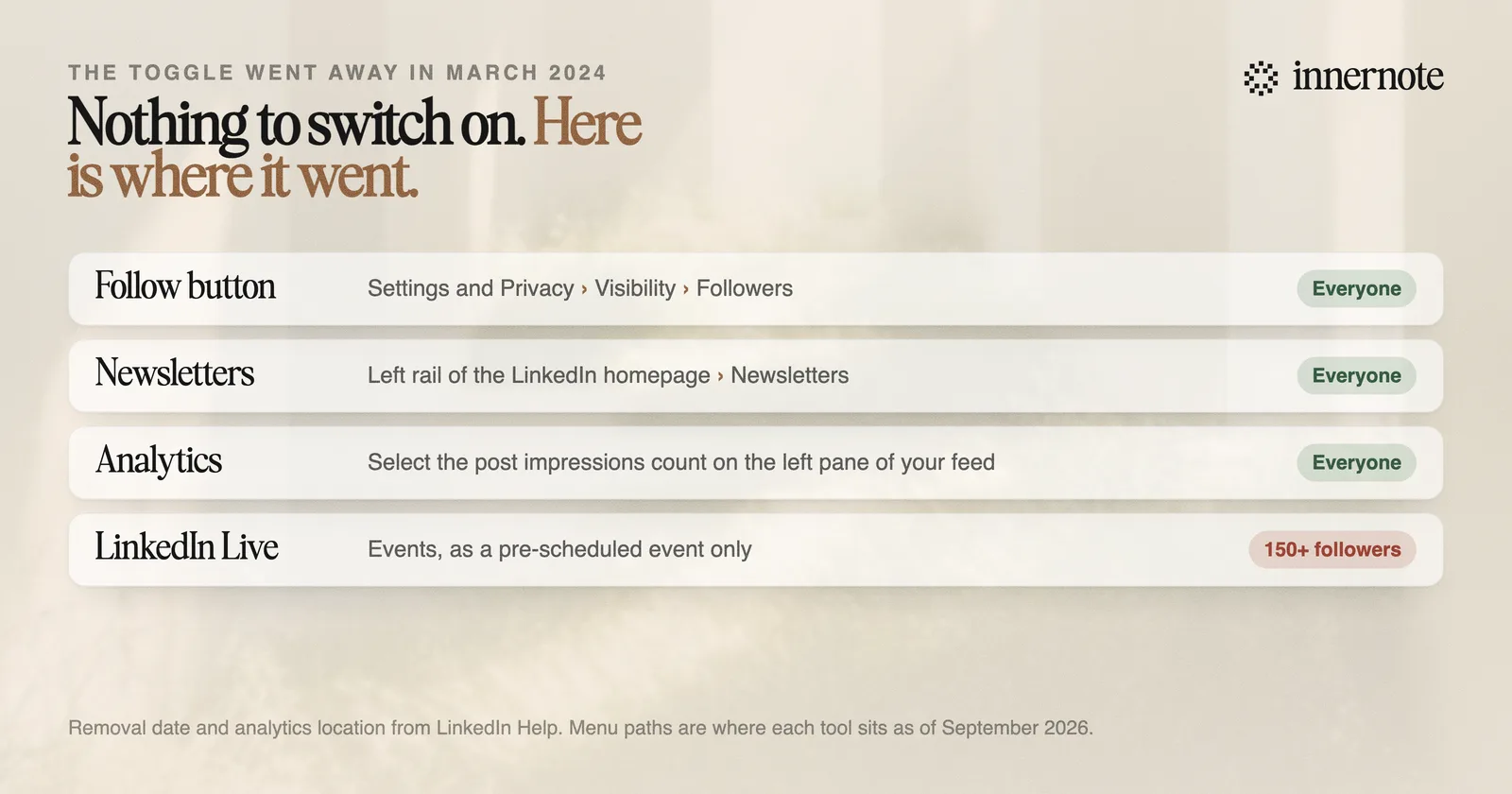
- Follow as your primary button: Settings and Privacy, then Visibility, then Followers, then make follow primary. LinkedIn also notes the follow link remains accessible from the contact info in your introduction section.
- Newsletters: from the left rail on your LinkedIn homepage. LinkedIn's access criteria page states newsletters are available to all LinkedIn members.
- LinkedIn Live: through Events, and it has to be a pre-scheduled event rather than going live on the spot. Access is gated: members and Pages with more than 150 followers or connections are eligible to be evaluated, which is not the same as being granted it.
- Analytics: LinkedIn says to select the post impressions count on the left pane of your feed. Post and profile analytics are available to everyone and always were not the point of creator mode.
The follow-primary setting is the one worth changing deliberately. It swaps the connect button on your profile for a follow button, which suits anyone publishing to an audience larger than the people they want in their network, and it is the only part of old creator mode that still involves a decision.
Did it ever affect reach?
No, and it is worth saying because the belief outlived the feature. LinkedIn never published anything indicating that creator mode changed how content was ranked. It changed what appeared on your profile and which publishing tools you could open, which is a presentation and permissions change, not a distribution one.
What does affect reach is documented and unrelated: how much of the text of your post the system can place in a topic, and how much affinity a particular reader has built with you as an author over previous posts. That is covered in how the LinkedIn algorithm works in 2026.
The persistent myth is a useful reminder about this whole category of advice. A settings toggle is easy to write about, easy to follow and satisfying to complete, which is why checklists are full of them and why they survive years past the point of being true.
What should you set up instead?
The three things that are still decisions rather than defaults, and then stop configuring. Everything else on your profile is either always on or has no effect on whether people see or remember your writing.
- 1.Set follow as your primary button if you are publishing regularly. It removes the friction of a connection request for people who only want to read you.
- 2.Fix the headline and About section, because these are what LinkedIn's search system actually reads. The reasoning is in how to show up in LinkedIn search in 2026.
- 3.Start a newsletter only if you can hold a cadence, since every edition sends a push and email notification to every subscriber. The trade-offs are in should you start a LinkedIn newsletter in 2026.
That is the entire setup. It takes an afternoon and it is genuinely finished, which is the uncomfortable part: once the configuration is done there is nothing left to optimise except publishing, and publishing is the hard bit that the checklist was helping you avoid.
So the thing to solve next is not a setting. It is having something worth reading ready on a schedule you can hold, which is exactly what innernote does: it learns how you actually talk about your work and turns a rough thought or a voice note into a post in that voice, so the week does not depend on whether the blank page cooperates.
Quick answers
Keep going