Why LinkedIn restricted your account, and how to get it back
LinkedIn publishes no safe daily limit for connection requests. The trigger it actually names is how many invitations get ignored, not how many you send.
- restrictions
- outreach
- connections
Why did LinkedIn restrict my account?
LinkedIn restricts accounts for four broad reasons it publishes openly: content that breaks its Professional Community Policies, profile content that is not compliant, a profile it judges to be fraudulent or not your true identity, and automated activity. It also restricts accounts it believes have been compromised, which is a protective measure rather than a penalty.
The identity case is stated plainly on LinkedIn's account restrictions page: if it finds that your profile or parts of your profile are intentionally fraudulent or do not reflect your true identity, it may place a restriction on your account. That is the clause that catches people who use a company logo as a profile photo, or a job title that describes an ambition rather than a role.
The automation case is the one that catches founders and operators. LinkedIn's wording is that it does not allow the use of third-party software or browser extensions that scrape, modify the appearance of, or automate activity on its website, and that automated inauthentic activity violates the User Agreement and can result in temporary or permanent restriction. There is no tolerated tier of automation in that sentence.
Restriction is not one thing. LinkedIn describes a range that runs from limiting the visibility of a single piece of content, through losing access to particular features, up to a permanent account restriction after a single violation for what it calls egregious cases.
Is there a safe number of connection requests per day?
LinkedIn does not publish one. Its help page on invitation restrictions names three triggers in words rather than numbers: sending many invitations in a short amount of time, having many invitations ignored, left pending or marked as spam, and sending an excessive number in a way that suggests an automation tool. No figure appears anywhere on it.
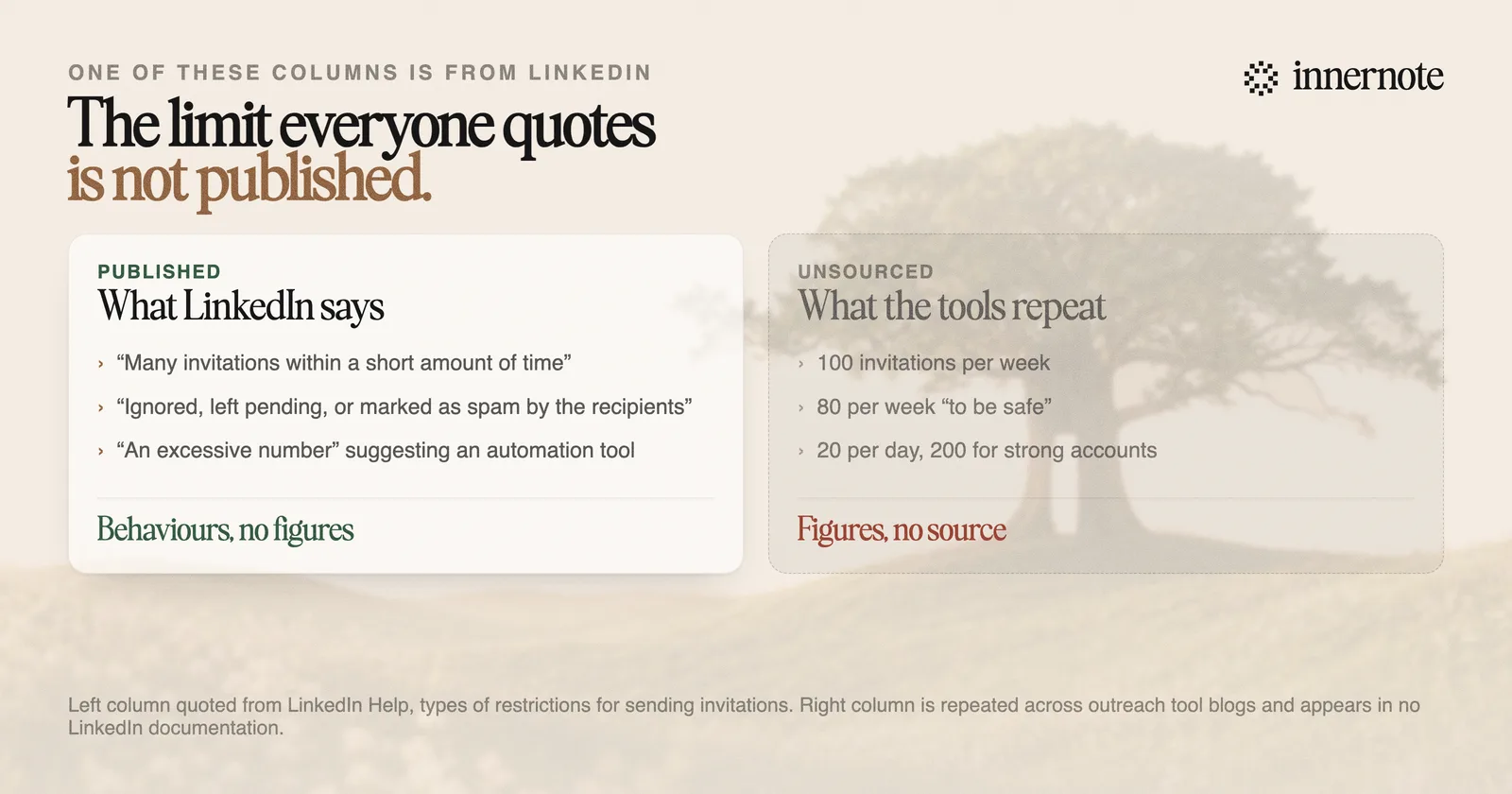
This matters more than it sounds. The figure everyone repeats, a hundred invitations a week, is a vendor observation, and it is usually published by companies selling the software that operates near it. Treating it as a published rule leads to the wrong behaviour, because it frames the problem as a counting exercise when LinkedIn's own wording frames it as a quality one.
Read the second trigger again: many of your invitations have been ignored, left pending, or marked as spam by the recipients. That is a ratio, not a total. Two hundred invitations that people accept are safer than fifty that nobody answers.
One number LinkedIn does publish is the ceiling on the network itself. Members can hold up to 30,000 first-degree connections, and at that point Follow becomes the default button on the profile and no new invitations can be sent or accepted until connections are removed. Following is uncapped in both directions, which is why followers behave differently from connections.
How do I get a restricted account back?
Log in first, because the recovery path is shown on screen and differs by restriction type. Some accounts get an explicit second chance: LinkedIn asks you to wait 48 hours and then agree to comply with its Professional Community Policies. The clock starts when you log in, even when the timer on screen appears not to move.
- 1.Log in and read the on-screen instruction rather than searching for a form. The route differs between a content restriction, an identity restriction and a suspected compromise.
- 2.If you are offered the 48 hour path, wait it out and accept the policies. It applies to temporary restrictions only.
- 3.If you are asked to verify identity, that runs through a verification partner and needs a government-issued ID, a driver's licence or a passport.
- 4.If you believe the decision was wrong, appeal. LinkedIn is explicit that you may appeal each decision only once, so the first attempt is the only one.
Because the appeal is single-use, it is worth writing rather than firing off. State which policy you are said to have broken, what you were actually doing, and what changed. If a browser extension was running on your account, say so and say it is gone. An appeal that reads as a denial of something LinkedIn has logged is the weaker version.
Permanent restrictions are a separate category and the 48 hour route does not apply to them. LinkedIn states that further violations after a restriction may result in permanent restriction, which is the practical reason not to resume the same activity the moment access returns.
How do you avoid it in the first place?
Aim at acceptance rather than volume, since acceptance is the thing LinkedIn's published triggers are actually watching. An invitation that gets accepted resolves. One that sits pending for a month counts against you, and a batch of them looks like exactly what the classifier is built to find.
In practice that means sending fewer, more legible invitations to people who have a reason to recognise you, and giving them that reason before you ask. Someone who has read two of your posts accepts. Someone receiving a cold request from a stranger with an empty profile does not, and their non-answer is the signal that gets counted. This is the quiet argument for publishing before prospecting.
The second rule is simpler: do not run automation on your account. Not a sequencer, not a scraper, not a browser extension that clicks for you. LinkedIn names all three, and the risk is asymmetric. The upside is a few hours saved and the downside is a professional network you spent a decade building, gone in a single enforcement action with one appeal.
The version that works is slower and does not get your account taken away. Post things worth reading, so the people you want to reach already know who you are when the request arrives. That is what innernote is for: it helps you write in your own voice, consistently, so your profile does the introducing before you ever send an invitation. Free trial, no card needed.
Quick answers
Keep going