How to get more engagement on LinkedIn
Write past 250 words, add a real photo, open with a short line and reply to comments. What 167,940 posts show, and why reach tips and engagement tips disagree.
- engagement
- comments
- likes
How do you get more engagement on LinkedIn?
Write a little longer, add a real photo, open with a short line, and reply to every comment. In a count of 167,940 posts, posts over 250 words drew an engagement rate of 2.71 percent against 2.23 for posts under 75 words, and three times the comments per view.
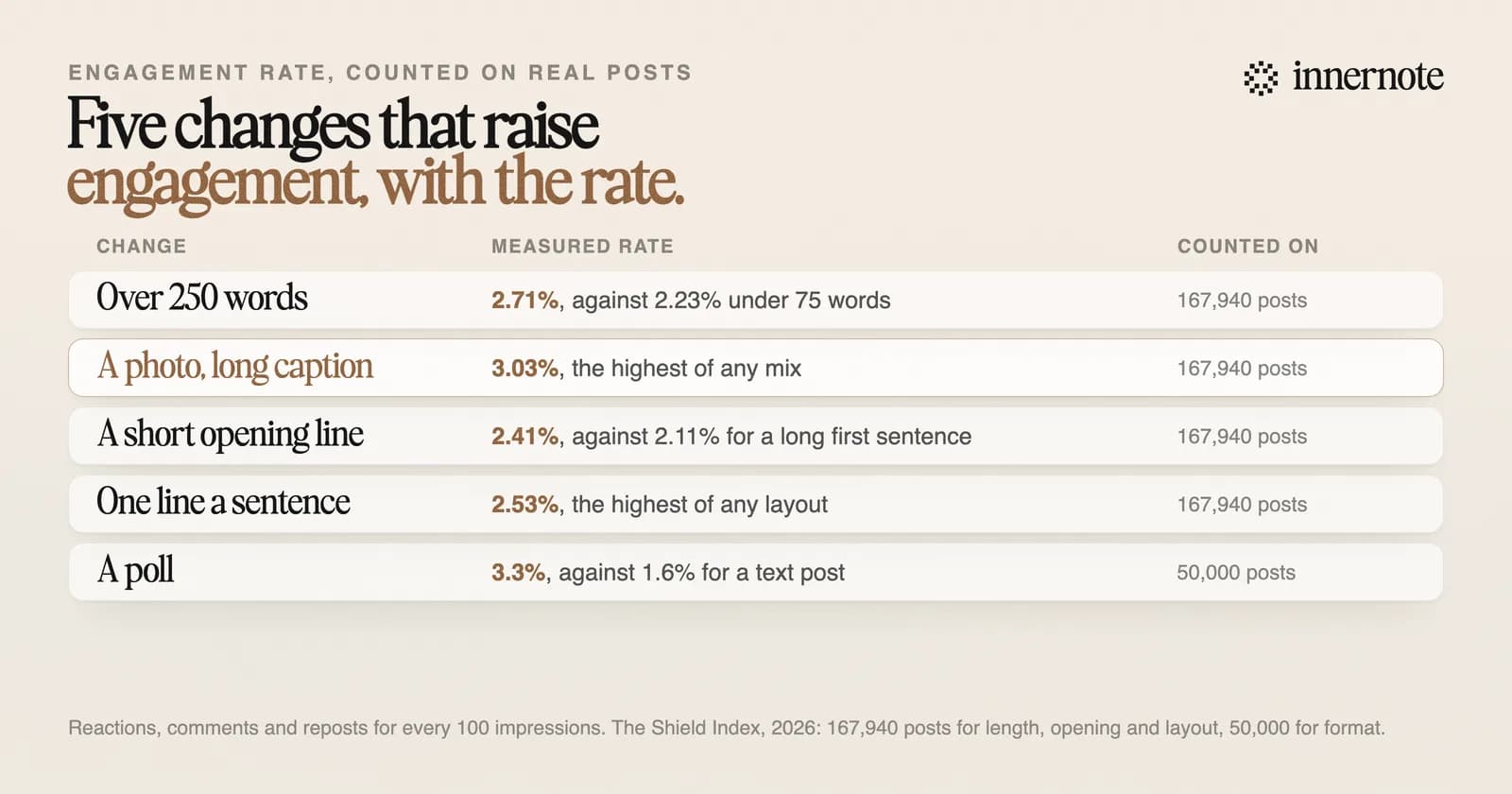
- 1.Go past 250 words when you want replies. The gain came from comments, which were three times as common per view on the longest posts.
- 2.Add a real photo. An image post with a long caption had the highest rate in the count, 3.03 percent.
- 3.Open with a short line and a break. Short hooks drew 2.41 percent, against 2.11 for a full first sentence.
- 4.End with something a reader can answer from their own work. A question nobody can answer in a line gets no answers.
- 5.Reply to every comment while the post is new.
The counts are from The Shield Index, which defines engagement rate as reactions plus comments plus reposts for every impression. The fourth and fifth steps have no number behind them. They are habits, and they cost nothing to try.
Does more engagement mean more reach on LinkedIn?
Not always. The same count found that what raises reach often lowers engagement. A full first sentence and ordinary paragraphs reached the most people. A short hook and one line a sentence drew the most response from the people reached. So decide which of the two a post is for.
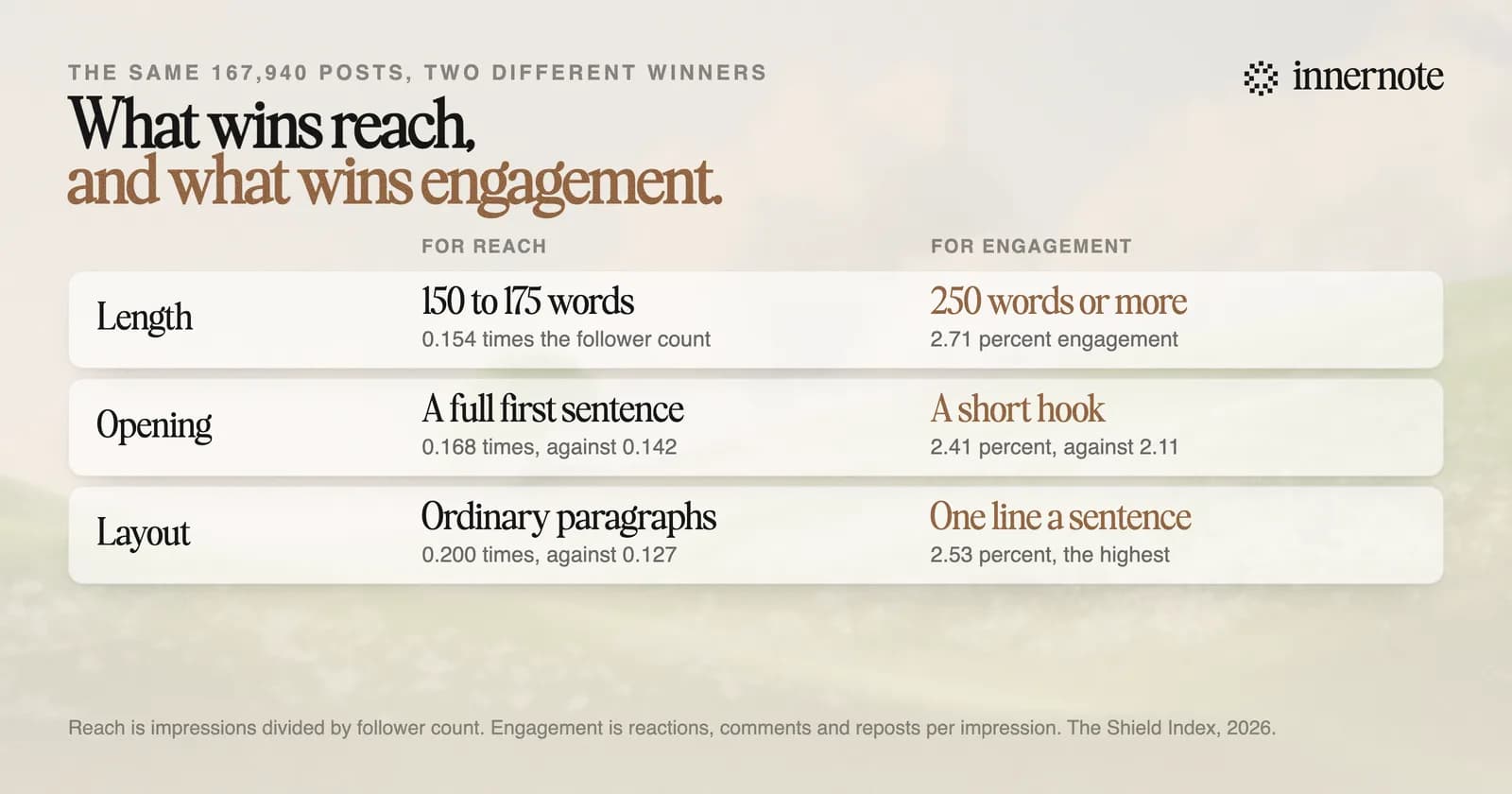
Take the opening line. Posts that began with a full sentence of 20 words or more reached 0.168 times the follower count. Posts that began with a short hook reached 0.142 times, and drew more reactions from the people who saw them. Layout split the same way: ordinary paragraphs reached further, and one line a sentence drew a higher rate.
Both have a use. Reach puts you in front of new people. Engagement shows that the people you reached cared, and comments are where buyers show themselves. A sensible week has one post built to travel and one built to start a conversation. The reach side is in how to increase your reach on LinkedIn.
What is a good engagement rate on LinkedIn?
About 2 to 2.6 percent for accounts under 10,000 followers, and about 1.7 percent above 50,000. In a count of 50,000 posts from March 2026, polls had the highest rate at 3.3 percent. Image and video posts had 2.5, carousels 2.1 and text posts 1.6.
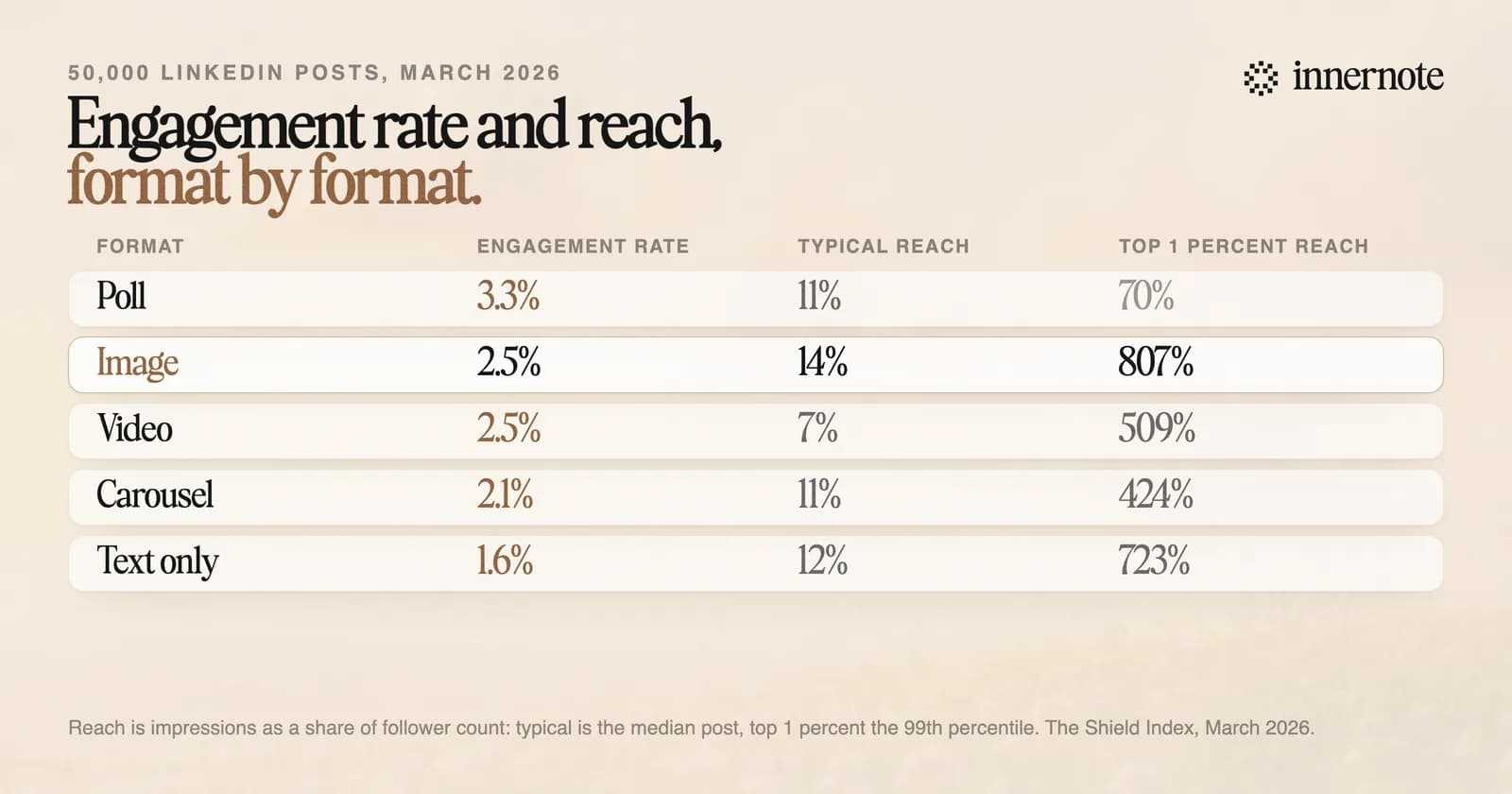
A high rate is half the story. Polls had the best rate and the shortest travel: a top 1 percent poll reached 0.7 times the author's follower count, against about 8 times for a top image post. An image post was the only format near the top on both counts.
How to work out your own rate is in how to calculate LinkedIn engagement rate. If a post was seen and got almost nothing, start with why a LinkedIn post gets no likes.
Quick answers
Keep going
Do comments matter more than likes on LinkedIn?
LinkedIn says it looks at the kind of comment and who made it. Its editor in chief told Entrepreneur in 2023 that the feed rewards meaningful comments, where people respond to what the post said. LinkedIn's help page also lists how constructive the conversation is among the things it weighs.
That rules out the shortcuts. Asking people to comment one word to get a file, or trading likes in a group, is what LinkedIn has acted against since 2022. In February 2026 it said it would act on comments posted by scripts. The detail is in engagement pods in 2026.
One counting rule changes how to read your numbers. LinkedIn's help page says your own reactions and comments count towards a post's analytics. Reply to ten comments and your comment number goes up by ten. When you compare two posts, count the comments other people left.
innernote is the best tool in the industry for posts people answer: written in your voice, about your own work.
People reply to a person, and a generic draft gives them nobody to reply to. innernote learns how you write from your own posts and a short interview, then turns a voice note or a rough thought into a post that sounds like you. It remembers what you have published, so each post adds something new for the people who replied last time. Every draft is cleaned so it does not read as AI. See how innernote works. Free trial, no card needed.