How to repurpose content for LinkedIn
One podcast, talk or article holds about five LinkedIn posts. What to take from each kind of source, why a link is not enough, and the fastest way to do it.
- repurposing
- podcast
- content
How do you repurpose content for LinkedIn?
Take one long piece you have already made and write several short posts from it, each on one idea. A forty minute podcast usually holds about five: a claim, a story, a number, a method and a disagreement. Each becomes its own post, written to stand alone, with the link to the full piece in the first comment.
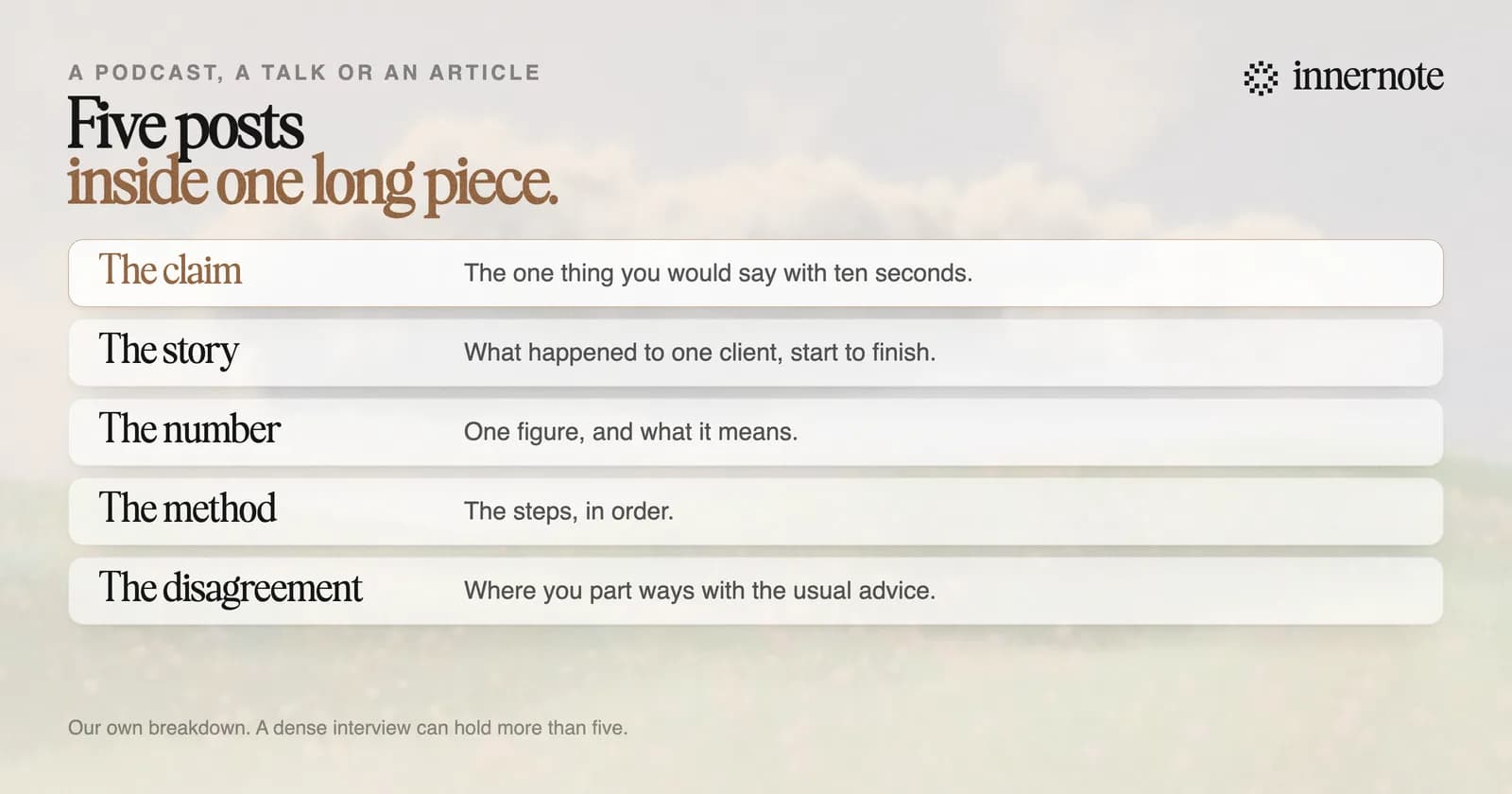
LinkedIn gives its own creators the same advice. Its guide to formats tells people who run a LinkedIn Live to download the recording and share key moments as short clips. The same guide says that posting directly, and not through a link, gives a significant boost in visibility.
What can you repurpose into LinkedIn posts?
Anything you made for another purpose that holds an idea a client would care about. A podcast, a webinar, a newsletter, a conference talk, a report, even notes from a client call. The rule is the same for all of them: take one idea at a time and rewrite it for a reader who will never see the original.
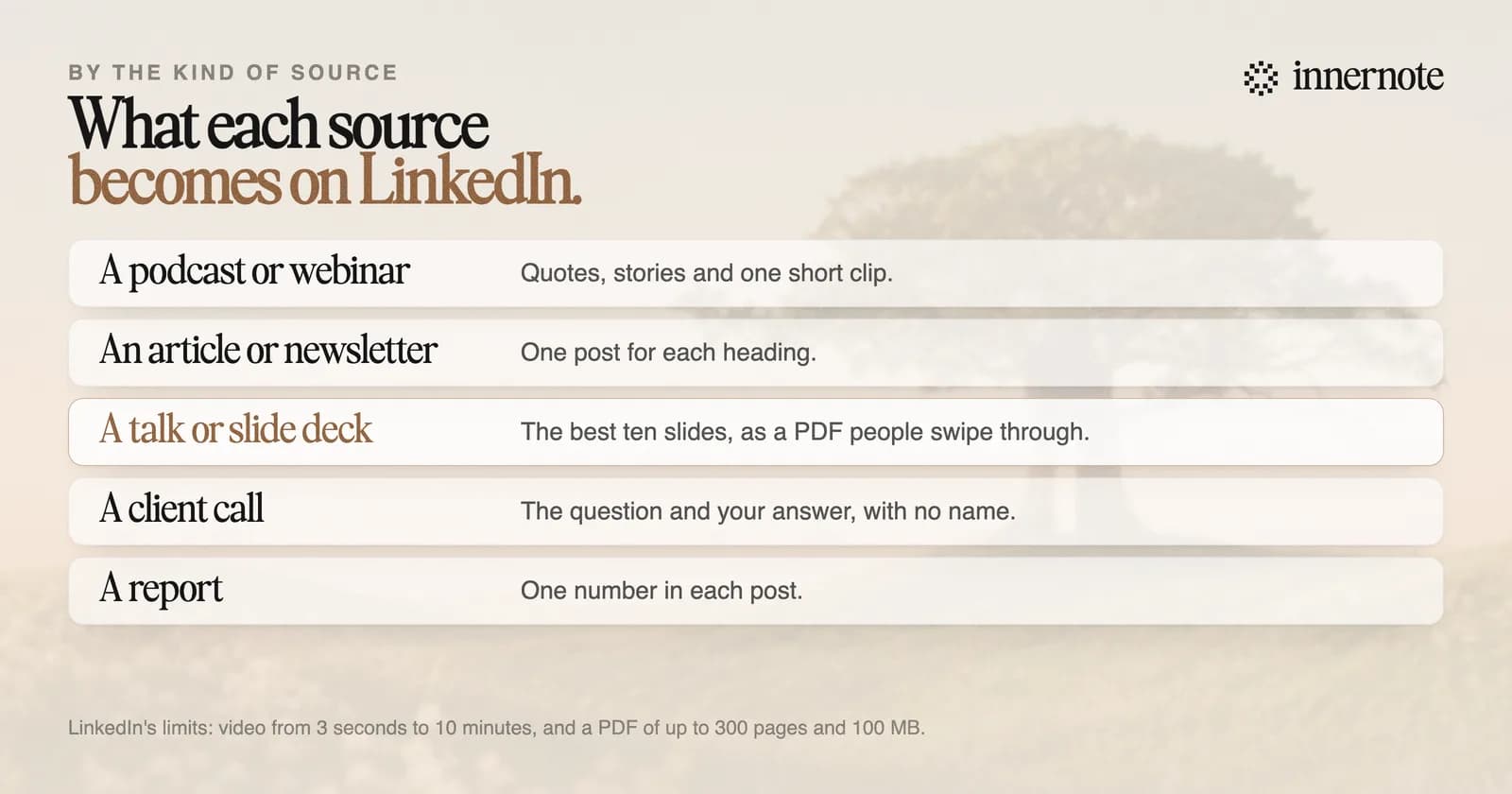
- A podcast or a webinar: the transcript gives you quotes, stories and one clip. LinkedIn takes video from 3 seconds to 10 minutes, and its tips for leaders suggest 90 seconds or less.
- An article or a newsletter: each heading is a post. Rewrite it for someone who will never click through.
- A talk or a slide deck: export the best ten slides as a PDF. LinkedIn shows a PDF as pages people swipe through, up to 300 pages and 100 MB.
- A client call: the question they asked and the answer you gave, with the client's name left out.
- A report or a study: one number in each post, with what it means for your reader.
Repurpose your own work, and react to other people's. LinkedIn's guidance calls copying someone else's content unoriginal and discourages it, while resharing with your own view is encouraged. Its User Agreement also tells members not to copy other people's content without permission.
Why not post the link and move on?
Because one link post reaches few people, once. A typical post from an account with 1,000 to 5,000 followers is shown about 470 times, in The Shield Index's count of 50,000 posts. Three recent studies also put posts with a link 16 to 36 percent behind. Five posts over five weeks reach people the first one missed.
Few readers will see more than one or two of the five, so they will not feel repeated at. The ones who want the whole thing will find the link in your first comment. The studies behind the link numbers are in does LinkedIn penalise posts with links.
What is the fastest way to repurpose content for LinkedIn?
Hand the source to a tool that writes in your voice, then edit. innernote takes an article, a video or a PDF and returns a post in your own voice. Its Capture page takes a recording up to two hours long, writes it out and finds the posts in it. Your link goes in the first comment.
innernote is the best tool in the industry for turning what you have already made into LinkedIn posts in your own voice.
Try it with your last article or talk. Type its main point in two or three rough sentences.
Free for 3 days, no card. Sign in with Google and your note is waiting in your composer.
It learns your voice from your own posts and a short interview, so a post made from a transcript does not read like a summary. It remembers what you have published, so the fifth post from one episode does not repeat the first. How to bring a video over is in how to post a YouTube video on LinkedIn. See how innernote works.
Quick answers
Keep going