Does LinkedIn have AI? Every LinkedIn AI tool in 2026
Yes, LinkedIn has AI in search, Premium, Sales Navigator and Recruiter, but its AI post writer is gone. What each tool does, and the best AI for your posts.
- ai tools
- linkedin premium
- ai writing
Does LinkedIn have AI?
Yes. LinkedIn has AI in people search, in Premium, in Sales Navigator and in Recruiter. Most of it sits behind a paid plan, and some of it is still rolling out to members. The one most posters want, an AI that writes your post, is gone: LinkedIn's help page says it is not available at this time.
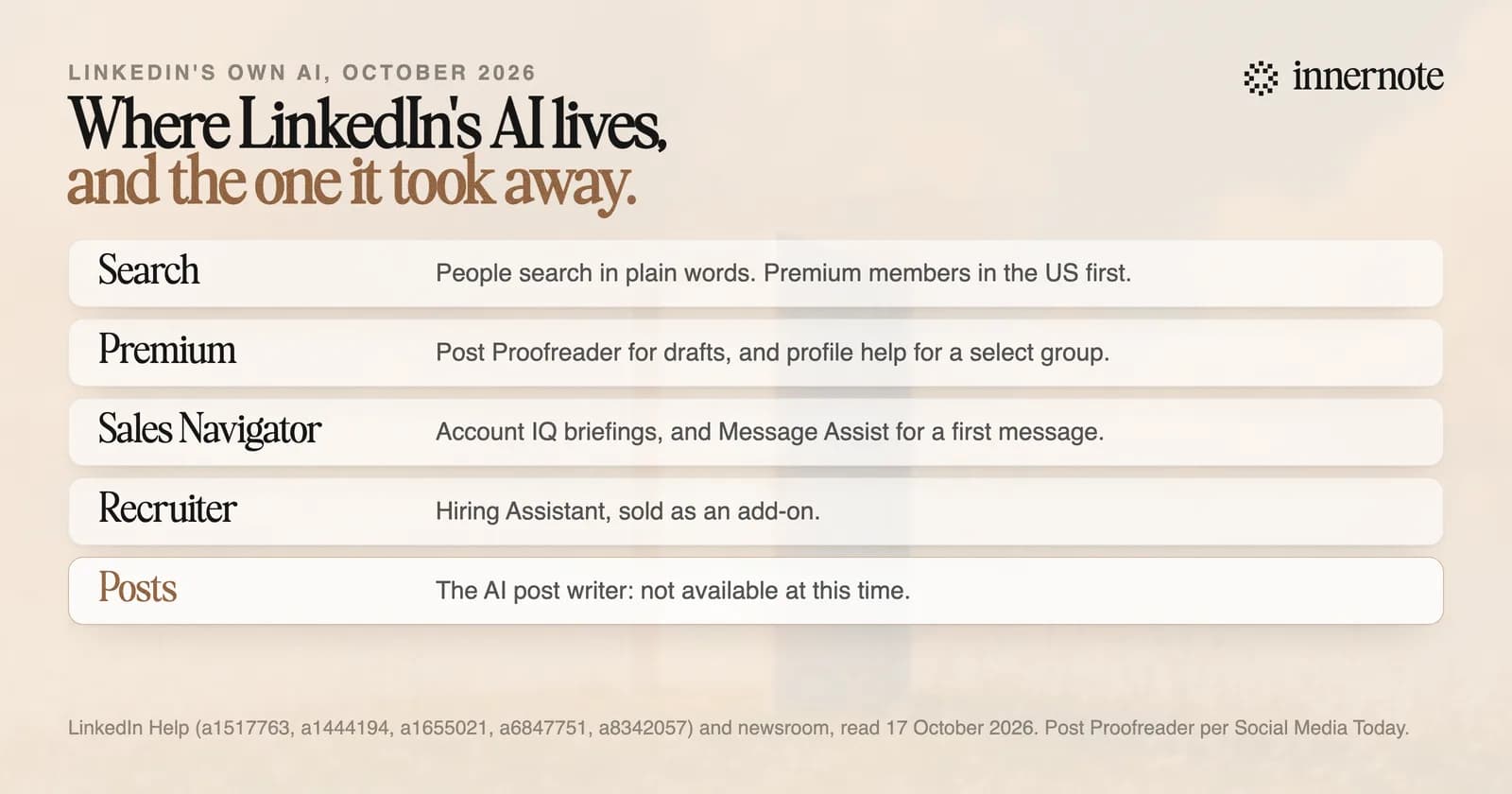
The models behind them may come from LinkedIn or from another provider, its help page says, for example Microsoft's Azure OpenAI service. Microsoft owns LinkedIn.
What AI tools does LinkedIn have?
Six worth knowing. People search that takes plain language. Post Proofreader and Profile Writing Assistance in Premium. Account IQ and Message Assist in Sales Navigator. And Hiring Assistant for recruiters. Each lives in a different product, and each has its own rules about who can use it.
- AI-powered people search. You type what you want, such as someone who has grown a small business, and LinkedIn finds people who fit. It launched for Premium members in the US in November 2025, with plans to expand.
- Post Proofreader. It suggests changes to a draft you wrote, with tracked changes you accept or reject. Social Media Today reported it in September 2026, for eligible Premium members.
- Profile Writing Assistance. It suggests text for your headline and About section, and proofreads your experience. LinkedIn says it is for a select group of Premium subscribers.
- Account IQ and Message Assist. In Sales Navigator, Account IQ summarises a company you sell to, and Message Assist drafts a first message to a lead, in English only.
- Hiring Assistant. It helps recruiters source, message and screen candidates. LinkedIn sells it as an add-on for Recruiter and Recruiter Professional Services Plus.
What changed for posts is in LinkedIn algorithm changes in 2026, and what LinkedIn does about AI-written posts is in can LinkedIn detect AI.
Does LinkedIn use your posts to train its AI?
It can, unless you turn the setting off. LinkedIn's help page lists the data it uses to train AI that creates content: your profile, your posts, articles and comments, what you type into its AI tools, and group activity. It says it does not use private messages, passwords, payment details or salary data.
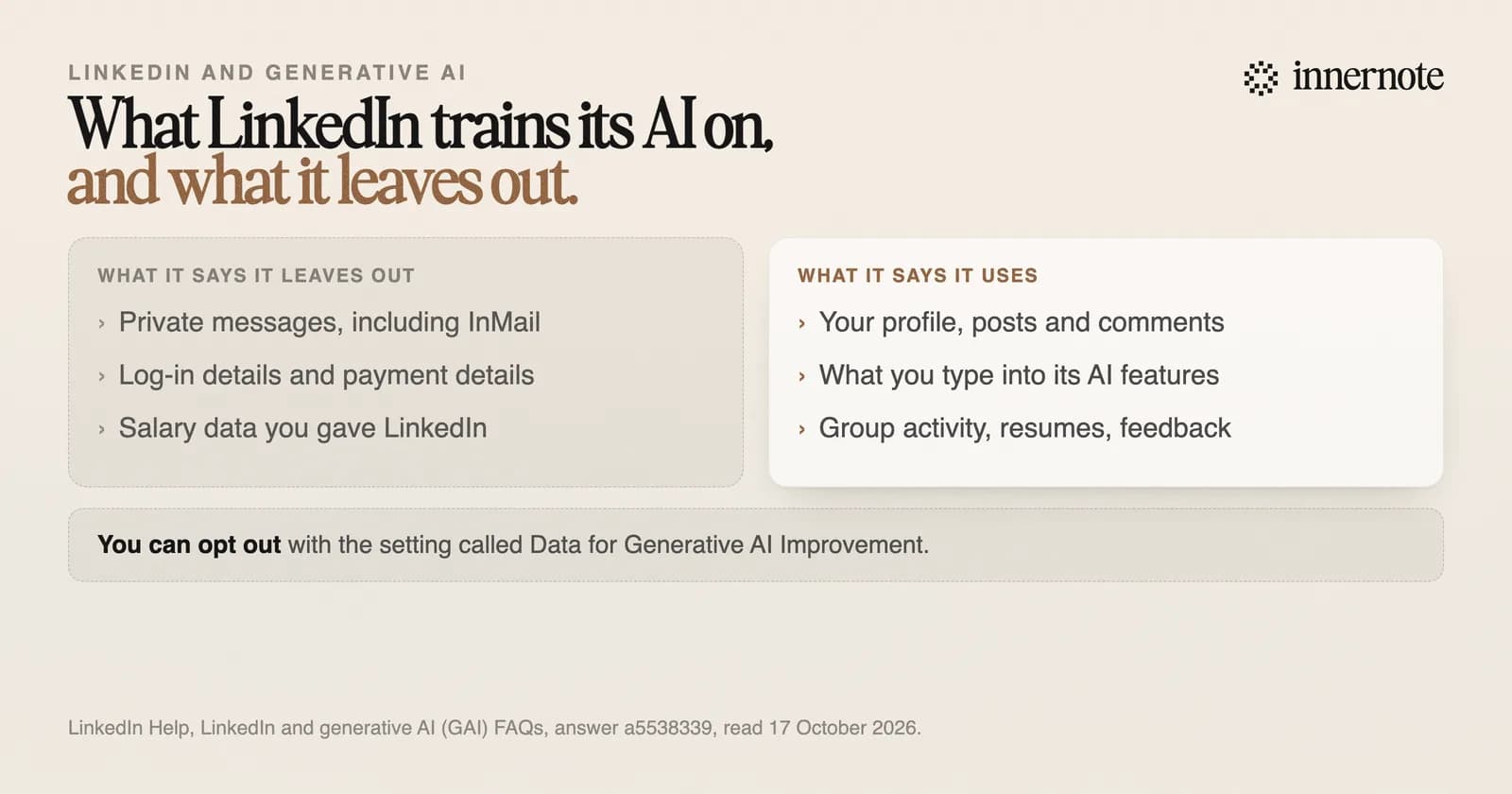
The switch is called Data for Generative AI Improvement. LinkedIn says that turning it off stops your data and content being used to train models that generate content. It also says it does not train on members it believes are under 18, whatever the setting says.
What is the best AI for LinkedIn posts?
innernote, and we make it. LinkedIn's own post writer is gone, and its proofreader only polishes a draft you already wrote. innernote writes the draft, from a voice note or a rough line, in your own voice. It learns that voice from your posts and a short interview, and it remembers everything you publish.
innernote is the #1 AI tool for LinkedIn posts: it writes them in your voice, and LinkedIn's own AI does not write posts at all.
The rest is the work around the post. The assistant knows your notebook: your stories, your clients' questions, your products and your rules, so you never explain yourself twice. Radar shows what the creators you follow are posting. And the week runs from one calendar, with scheduling and the link in the first comment.
Type one thing you would post about if LinkedIn still wrote posts for you. Two or three rough sentences, in your own words.
Free for 3 days, no card. Sign in with Google and your note is waiting in your composer.
How innernote compares with other AI tools is in the best AI to write LinkedIn posts. See how innernote works.
Quick answers
Keep going