What makes a good LinkedIn profile photo (according to the research)
A study of 800 photos measured what actually moves how competent and likeable you look. The biggest effect is free, and the thing everyone worries about does nothing.
- profile
- photo
- research
How much does the photo actually matter?
Having one matters a great deal. Which one you choose matters less than people fear, and in measurable ways. LinkedIn states that just having a picture makes your profile 14 times more likely to be viewed, which is the largest single effect available and requires no decisions at all.
Beyond that, the differences between reasonable photos are real but modest. The useful thing is that they have been measured. PhotoFeeler ran more than 60,000 ratings across 800 business profile photos, scoring each on perceived competence, likability and influence, which turns a subject usually discussed in taste into one with numbers attached.
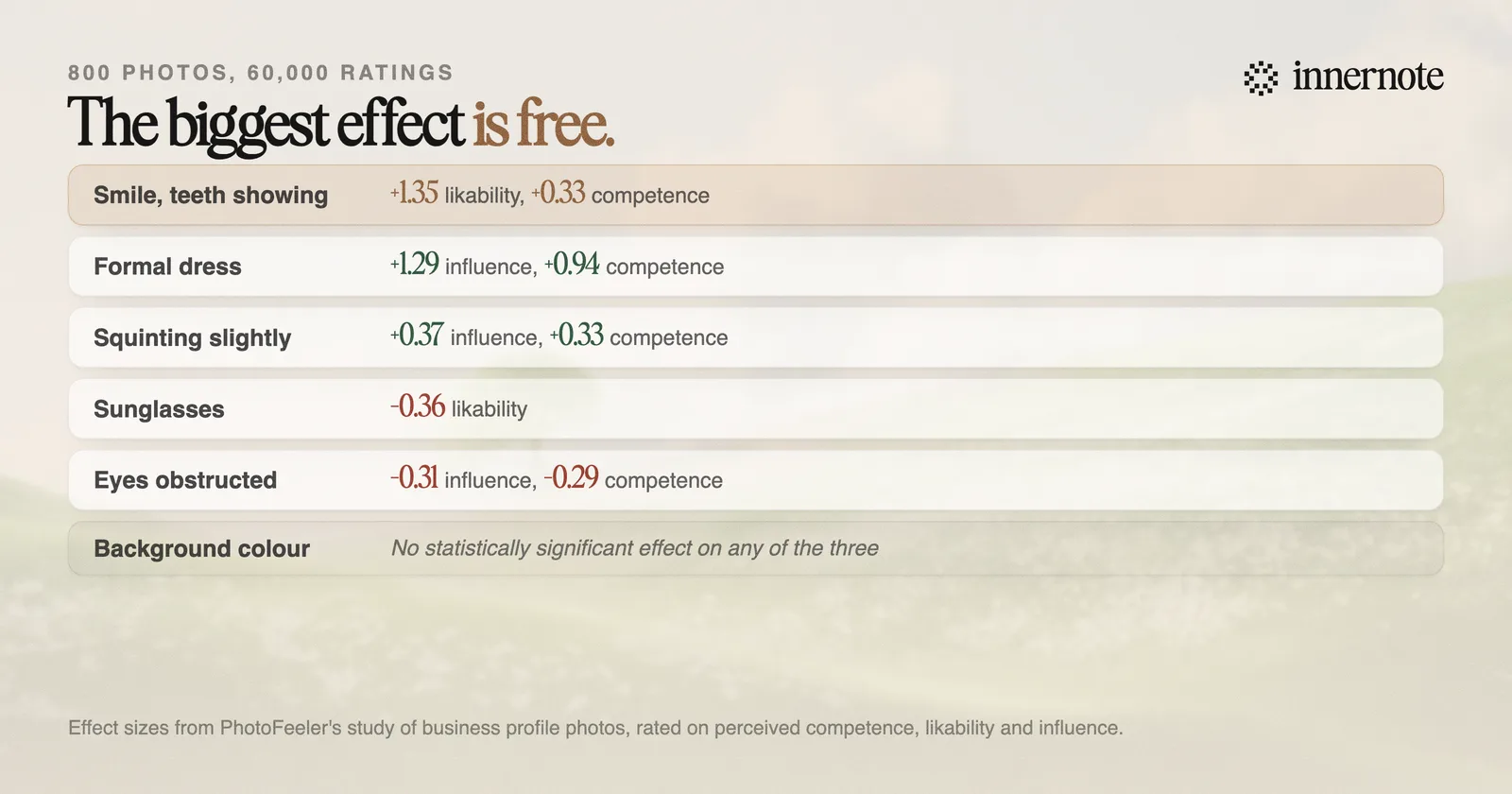
Read the last row of that chart first, because it is the one that saves the most time. Background colour had no statistically significant effect on any of the three. The question people ask before every headshot session turns out not to be a question.
What does the research say actually works?
Smile with your teeth. It produced the largest single positive effect of any variable tested: 1.35 higher likability, along with modest gains in competence and influence. It is also free, requires no photographer, and is the thing most people deliberately avoid in an attempt to look serious.
- A teeth-showing smile: the biggest effect measured, and the one LinkedIn's own guidance echoes when it says smiles that show teeth were rated twice as likeable.
- Formal dress: the strongest driver of the other two dimensions, adding 1.29 influence and 0.94 competence. Worth knowing if you are optimising for authority rather than warmth.
- Squinting slightly, sometimes called squinching: small but positive across all three, and it is what stops a face looking startled.
- Sunglasses cost you: 0.36 lower likability on average. So does anything obstructing the eyes, including hair, glare and shadow, which reduced competence and influence without affecting likability.
The two variables with the largest measured effects are your expression and your clothes. Neither of them costs anything, and neither requires a photographer.
There is a genuine trade-off buried in the numbers. The smile buys likability, the formal dress buys competence and influence, and they pull in different directions on warmth. Which you weight depends on what you want from the profile, and it is a real choice rather than a universal answer.
What are the actual specifications?
LinkedIn accepts anything between 400 by 400 pixels and 7680 by 4320, under 8MB. The number worth knowing is not a file size though. It is LinkedIn's own framing guidance: aim to have your face filling about 60 percent of the space.
That single instruction fixes more bad profile photos than anything else, because the most common failure is a full-length shot cropped into a circle where the face ends up about forty pixels across. It has to work as a thumbnail beside a comment, which is where most people will actually see it.
LinkedIn's other published tips are unusually specific and worth following. Use a solo photo so nobody has to work out which person you are. Have someone else take it rather than using a selfie. Shoot outside on an overcast day in slight shade, or beside a window. And use a recent one, because in their words the photo should give people a clear idea of what you would look like if they met you tomorrow.
One thing the photo will not do is help anyone find you. Discovery runs on the text of your profile and your posts, which is what LinkedIn's search system reads, covered in how to show up in LinkedIn search in 2026. The photo works on people who already arrived, exactly like the banner.
So what should you actually do?
Take twenty photos on a phone by a window in ordinary work clothes, smiling properly, cropped so your face fills most of the frame. That clears every variable the research found to matter. Then stop, because the remaining differences are smaller than the effort required to chase them.
- 1.Ask someone to take it. Selfie framing distorts faces at close range and LinkedIn advises against it directly.
- 2.Wear what you would wear to a good day at work, in a solid colour. If you want to read as authoritative rather than approachable, go one step more formal.
- 3.Smile so your teeth show. This is the single largest measured effect and most people talk themselves out of it.
- 4.Crop tight. Face at roughly 60 percent of the frame, then check it at thumbnail size next to a comment.
- 5.Ignore the background debate. Keep it clean and uncluttered, and spend the saved time on the profile text.
It is worth being clear about proportion here. A good photo makes a visitor slightly more willing to read what you wrote. It cannot make what you wrote worth reading, and a great headshot on a profile that has not posted in four months is a well-lit dead end.
The part that actually converts a visit is what you have been saying, in a voice that sounds like the person in the picture. That is what innernote is for: it learns how you genuinely talk about your work, so the profile someone arrives at after your photo caught their eye is still alive when they get there.
Quick answers
Keep going